Introduction
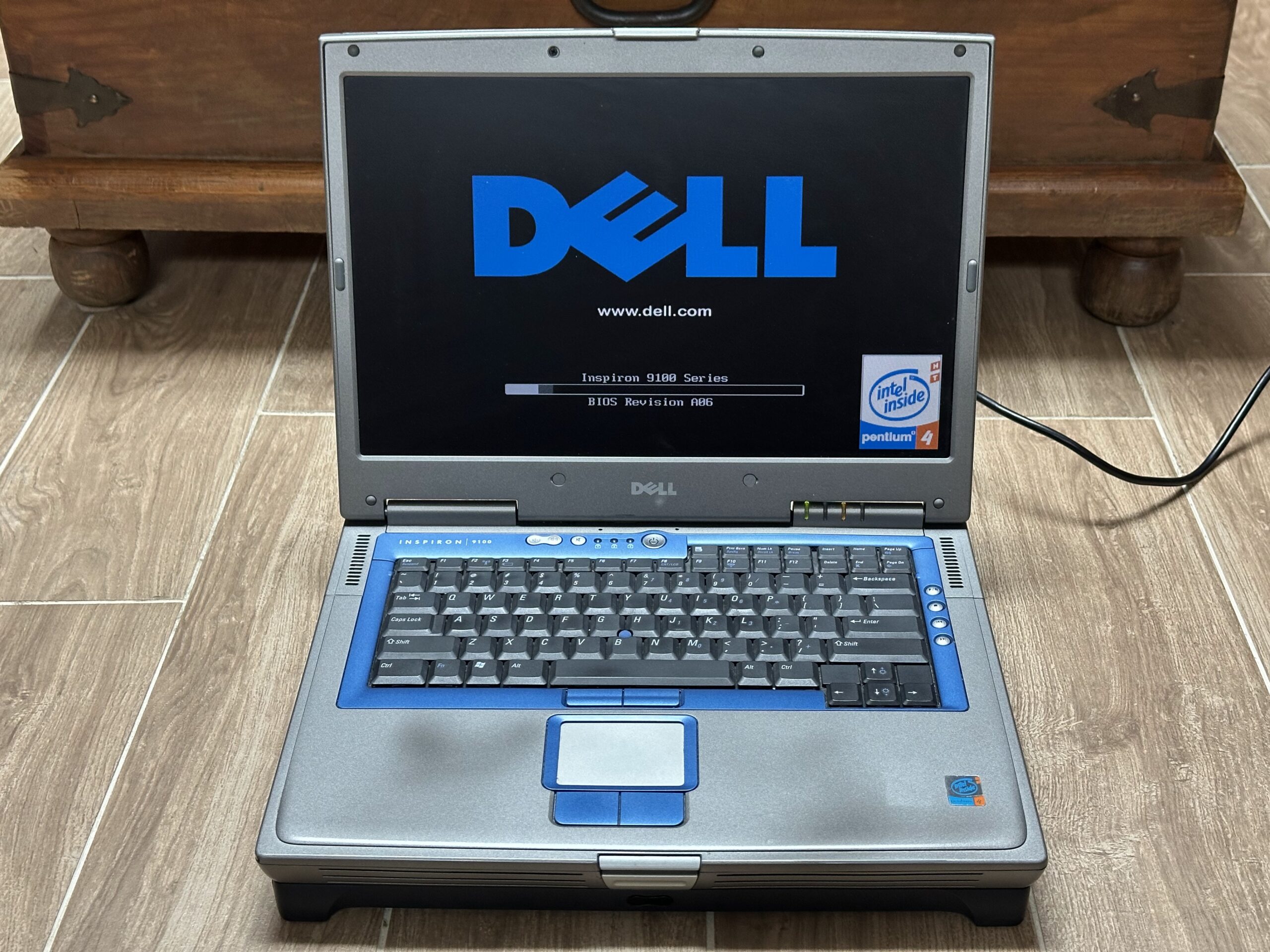
Dell Inspiron 8600 was designed for Windows XP. However, it does look like a great candidate for a Windows 98 retro laptop.
As it came not very much later than the transition of the industry to Windows XP it’s still possible to install Windows 98 on it. It is not as easy as just installing Windows 98, downloading drivers for it from Dell website though.
Instead, it required some searching around for the right drivers and also some trial and error actions.
I have documented my journey so I can refer to it later as well as possibly it will help others who are going through a similar task.
Architecture
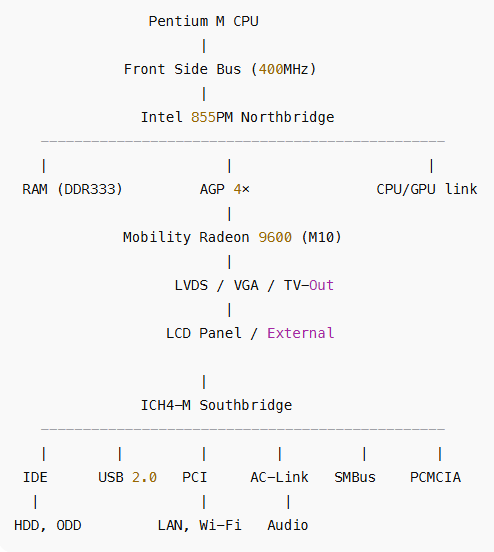
- Chipset – Intel 855PM (Carmel family)
- Northbridge – Intel 855PM
- Southbridge – Intel ICH4-M (82801DBM). Handles, IDE controller, USB 2.0, PCI bus, Audio, LAN, PCMCIA,SMBus and ACPI
- RAM – DDR SODIMM slots: 2, Official max: 2 GB (2×1GB DDR266/333)
- GPU – ATI Mobility Radeon 9600 Pro (some have NVidia). Fully discrete and connected via AGP 4×
- Display options – 1280×800 (WXGA), 1680×1050 (WSXGA+ – my case) or 1920×1200 (WUXGA) – high-end
- Primary Drive – 2.5″ IDE (PATA) HDD
- Optical Drive
- Audio – Sigmatel STAC9750/51 AC’97 codec
- Ethernet – Broadcom 440x (10/100) on PCI bus
- 56k Modem – Conexant AC’97 via AMR interface
- Wi-Fi – Dell TrueMobile (Broadcom) or Intel PRO/Wireless 2200BG (PCI Mini-PCI card slot – my case)
Bus diagram
Windows 98 and drivers installation
Nothing special or complicated with the installation of Windows 98SE.
As usual, install your favorite distro of Windows 98SE from a CD. The process should be smooth and painless.
Once Windows 98 has been installed, you will see lots of devices in Device Manager with the yellow exclamation mark. Windows 98SE does not have all the neccesary drivers for 8600 and here is where we will need to help it.
The first “great” news that you will find out is that your CD- or DVD-ROM drive is not available in Windows 98.
It is a pretty big downer since we need a way to install drivers (at least the USB Flash storage drivers). We will tackle this first.
The approach that I took was:
- Download Windows 98 Intel 855PM Chipset drivers and burn them on a CD blank CD (you can also add to the same CD all the other drivers mentioned in this post)
- Boot from CD into Windows 98 Command prompt – CD still works in DOS mode
- Copy (using command prompt) the drivers from CD to laptop’s HDD, for example to “c:\drivers” folder
- Reboot into Windows 98 and install the chipset drivers
- Reboot again
Once rebooted Windows 98 will prompt about a few components and their driver installation. However, after that, I still found that the CD was not listed.
The reason in my case was that Intel(R) 82801DBM Ultra ATA Storage Controller – 24CA was having a resources confict (even though no conflics were listed in its properties).
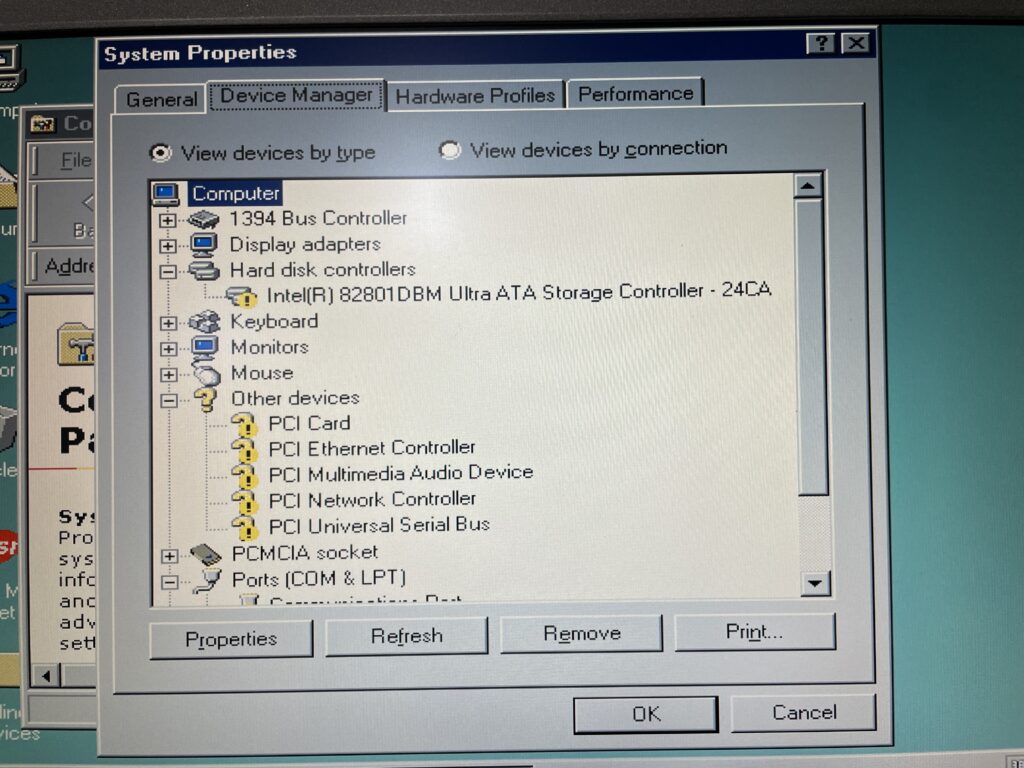
To fix this I did the following – set Input/Output Range to 00E0-00EF.
Once rebooted it again, there was no yellow exclamation mark against Intel(R) 82801DBM Ultra ATA Storage Controller – 24CA anymore and Windows 98 successfully added two other devices associated with HDD and CD. I was then able to see the CD Drive in My Computer.
Then, I proceeded to load other drivers.
I started with the USB Storage device driver – Nusb33e.exe. This gave me an ability to use a USB stick to load other drivers instead of heaving to use CDROM.
Now we can proceed to fixing the Video driver. Dell does not have any Windows 98 drivers for ATI Radeon Mobility 8600 (at least I could not find one). What I ended up doing is using a driver from a Lenovo laptop that also uses the same adapter.
The Lenovo video driver installation .exe did not work (it said it could not find a matching driver) so I had to manually install the driver by pointing the Standard VGA adapter that I had listed under Display Adapters in Device Manager by clicking Have Disk button and pointing it to the INF file that I found in the driver installation pack for the Lenovo laptop.
This way the installation worked however the resolutions I could select did not have my laptop’s 19:10 ratios. They only had 1600×1200 where as my laptop native resolution is 1680×1050.
To get this sorted I had to manually add the resolution to the INF file and reinstall the driver. I had included the modified INF file to the driver back below (the file is is called ati\Driver\9x_inf\C9_15549_modified.inf).
Sound driver installed smoothly – Si3112.inf.
Ethernet driver was a bit of a pain. I ended up installing the version 4.23 of the INF for Windows 2000, Me, and 98SE Broadcom 440x (10/100). The way to install it is to manually point it to the bcm4sbe5.inf file.
I also had to edit this file to add my hardware subsystem. Otherwise, the driver would not install (last line is what I added):
[BROADCOM]

%BCM4401%     = BCM4401_broadcom, PCI\VEN_14E4&DEV_4401&SUBSYS_08BC103C
%BCM4401%     = BCM4401_broadcom, PCI\VEN_14E4&DEV_4401&SUBSYS_81271028
I did not borther installing the modem and fixing the COM and LPT ports which had exclamation marks. I just disabled them as I don’t need them.
The last thing left was WIFI (Intel PRO/Wireless 2200BG). From what I researched it is impossible to get it working under Windows 98 so I gave up as Ethernet will suffice. Combination of Ethernet and USB flash drive is enough for me.
Maybe I will obtain another WIFI adapter (more friendly with Windows 98) later.
Drivers
Here is the zip archive with all the drivers that I used.


Leave a Reply